实现虚拟列表
点击下方按钮,AI 将为您生成文章摘要
虚拟列表是一种高性能渲染长列表的前端优化技术,核心思想是只渲染可视区域内的元素,而非一次性渲染全部数据。 这能显著减少 DOM 节点数量,解决大数据量列表的卡顿问题。
保持滚动条一致
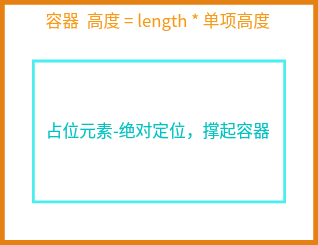
由于我们是渲染部分数据,但是容器的滚动条 又要像渲染所有数据的滚动条那样保持一致(滚动条滑到底是最后一条,滑到顶是第一条)。 因此我们需要一个占位元素,使用绝对定位撑起父容器,让容器的可滚动高度保持渲染所有数据的滚动条高度一致。很容易知道,占位元素的高度就是所有项的高度之和。
<template>
  <!-- 容器 -->
  <div class="virtual-list" :style="{ height: `${CONTAINER_HEIGHT}px` }">
    <!-- 占位元素:撑开滚动条 -->
    <div class="placeholder" :style="{ height: `${totalHeight}px` }" />
  </div>
</template><script setup>
// 配置参数
const ITEM_HEIGHT = 50; // 每项固定高度
const CONTAINER_HEIGHT = 400; // 容器高度
// 总高度
const totalHeight = computed(() => {
return data.length * ITEM_HEIGHT;
});
<script><style scoped>
.virtual-list {
width: 100%;
max-width: 600px;
overflow-y: auto;
position: relative;
border: 1px solid #ddd;
border-radius: 8px;
margin: 20px auto;
}
.placeholder {
position: absolute;
top: 0;
left: 0;
right: 0;
pointer-events: none;
}
</style>确定可见范围
首先,我们可以将虚拟列表的各个区域分为上下的缓冲区,中间的可见区域。缓冲区是在可见区域的基础上多渲染几项,避免滚动时白屏。例如,我们的 容器高度为 CONTAINER_HEIGHT 是400,每一项高度 ITEM_HEIGHT 是50,那么可见区域实际显示的项数是 CONTAINER_HEIGHT / ITEM_HEIGHT。 我们避免滚动时白屏,可以在上下多渲染两项。
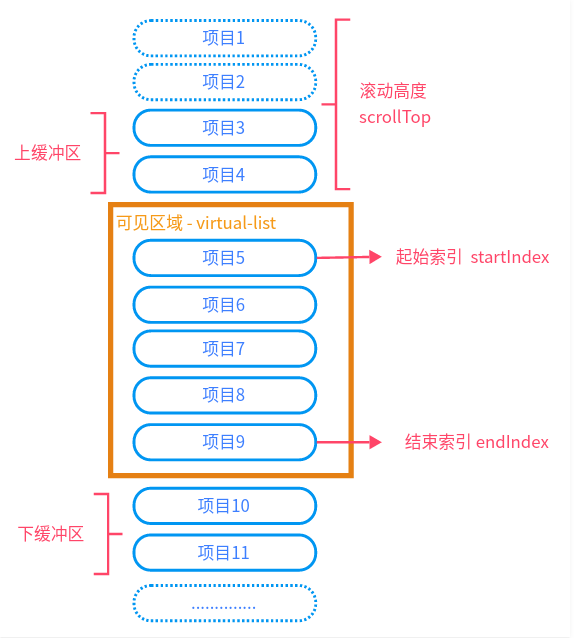
我们可以通过在容器上绑定一个监听事件,来获取滚动的高度 scrollTop。scrollTop 是唯一的状态变量,所有计算都依赖它。
<script setup>
// 滚动位置
const scrollTop = ref(0);
// 滚动处理
const handleScroll = (e) => {
  scrollTop.value = e.target.scrollTop;
};
<script><template>
<!-- 容器 -->
<div
ref="containerRef"
class="virtual-list"
@scroll="handleScroll"
:style="{ height: `${CONTAINER_HEIGHT}px` }"
>
.....
</div>
</template>从上图中可以看到,起始索引为 scrollTop 除以每一项高度 ITEM_HEIGHT 向下取整,再减去 缓冲区大小 BUFFER_SIZE 的结果,同时它的最小值为0。
结束索引为 scrollTop + CONTAINER_HEIGHT 除以每一项高度 ITEM_HEIGHT 向上取整,再加缓冲区大小 BUFFER_SIZE 的结果,且最大值为数据项数减1。
确定了可见范围后,我们就可以从数据里面获取需要渲染的项了。
const BUFFER_SIZE = 2; // 缓冲区大小

const startIndex = computed(() => {
  return Math.max(0, Math.floor(scrollTop.value / ITEM_HEIGHT) - BUFFER_SIZE);
});

const endIndex = computed(() => {
  return Math.min(
    data.length - 1,
    Math.ceil((scrollTop.value + CONTAINER_HEIGHT) / ITEM_HEIGHT) + BUFFER_SIZE,
  );
});

// 可见数据
const visibleItems = computed(() => {
  return data.slice(startIndex.value, endIndex.value + 1);
});
偏移量
我们虽然完成了虚拟列表的核心 - 确定可见范围,但事情还没有结束。计算偏移量!如果到此,我们执行我们的虚拟列表会发现。 随着我们逐渐滚动,可见区域也会跟着向上滚动,且此时里面的数据还再增加!
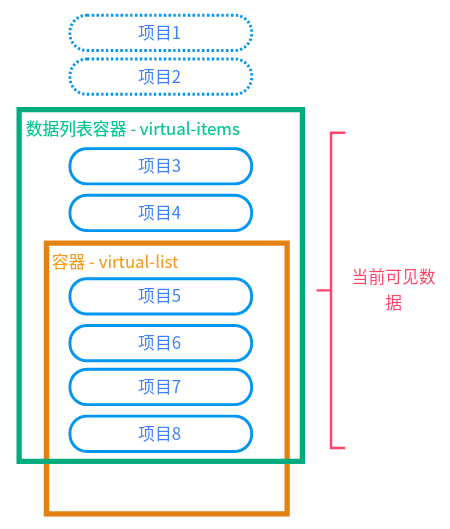
这是因为我们的可见区域同样是在父元素上滚动。但我们滚动时,可见区域里的数据因滚动而改变,由于设置了缓冲区且初始时上缓冲区没有数据,因此 我们刚开始的滚动没有问题。 但当滚动到一定位置,此时可见数据总是保持 2 + 8 +2 项,可见区域 visible-items 的高度也因此固定, 继续滚动可见区域 visible-items 就会脱离我们的固定容器 virtual-list,虽然此时可见数据仍在变化。
因此,我们在滚动过程中需要将可见区域拉会容器。需要拉回多少呢?
起始需要拉回的距离,就是 startIndex 之前的高度。因为当可见数据达到最大项时(上缓冲区有数据 ), 我们此时继续滚动 可见区域 visible-items 就开始向上移动,而向上移动的距离就正是 startIndex 之前的高度,我们需要将可见数据的第一条拉回缓冲区的顶部。 所以我们可以使用 translateY 将可见区域 visible-items 拉回 startIndex.value * ITEM_HEIGHT 偏移量。
<script setup>
// 偏移量
const offsetY = computed(() => {
  return startIndex.value * ITEM_HEIGHT;
});
</script><template>
<!-- 容器 -->
<div
ref="containerRef"
class="virtual-list"
@scroll="handleScroll"
:style="{ height: `${CONTAINER_HEIGHT}px` }"
>
<!-- 占位元素:撑开滚动条 -->
<div class="placeholder" :style="{ height: `${totalHeight}px` }" />
<!-- 可见项容器:通过 ormtransf 定位 -->
<div class="visible-items" :style="{ transform: `translateY(${offsetY}px)` }">
<div v-for="item in visibleItems" :key="item.index" class="list-item">
{{ item.content }}
</div>
</div>
</div>
</template>到这里,我们的虚拟列表已经完成。